TAB: Rebuilding the Bar Tab for the Mobile Age
A proposal for a nightlife app built around one simple idea: open a tab once, order throughout the night, and pay when you leave.
One night, one running tab
A night out is not a sequence of unrelated checkouts. It starts with choosing a place and finding friends, continues through rounds and shared orders, and ends with settling the bill.
TAB is designed to bring those stages into one continuous experience. Its core principle is the familiar bar tab: open it once, add rounds throughout the night, and tip and pay when leaving, rather than repeating a payment screen after every drink. Discovery, coordination, ordering, and settlement belong to the same evening, even though they ask different things of the interface.
TAB is a product concept and interactive prototype. Payments are simulated; safety features describe the proposed experience.
- Find a venue
- Open tab
- Send rounds
- Close, tip & pay
Find your night
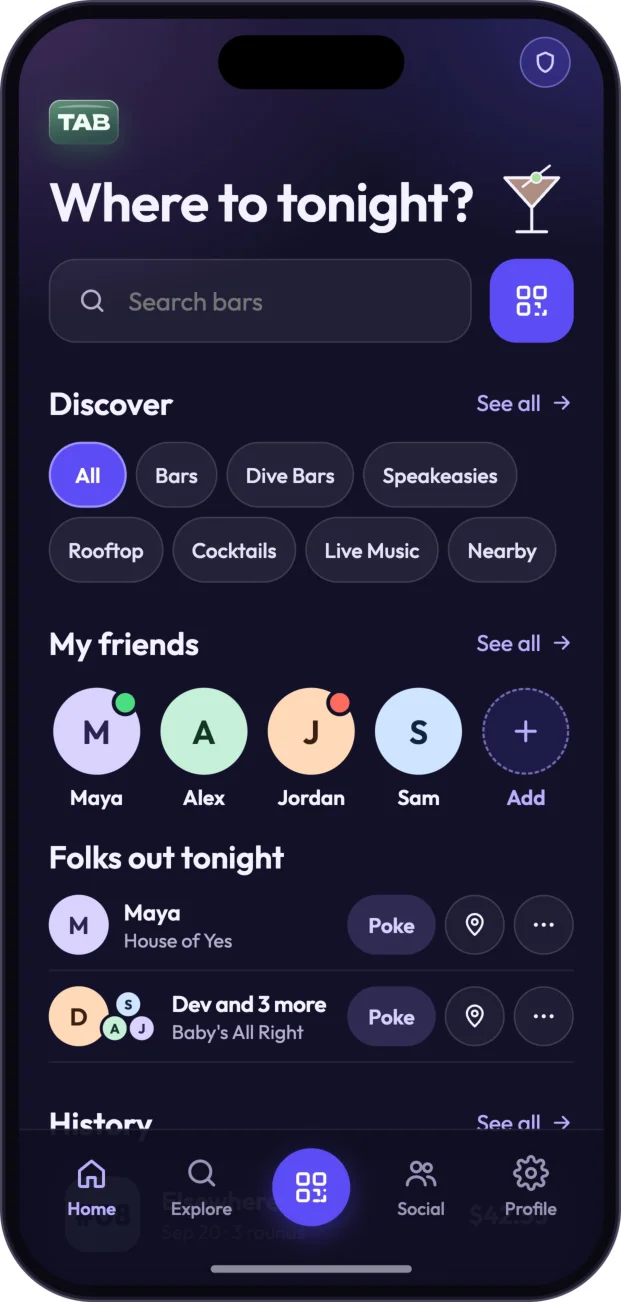
Home opens with “Where to tonight?” and discovery filters for All, Bars, Dive Bars, Speakeasies, Rooftop, Cocktails, Live Music, and Nearby. Search uses House of Yes as an example and shows related venues. Alongside discovery, My friends and Folks out tonight bring friend venue presence into view, with a Poke option. History records previous venues, rounds, and totals; when a tab is open, Home instead also surfaces the venue, order number, round count, and running balance. Home, Explore, Social, and Profile form the bottom navigation.
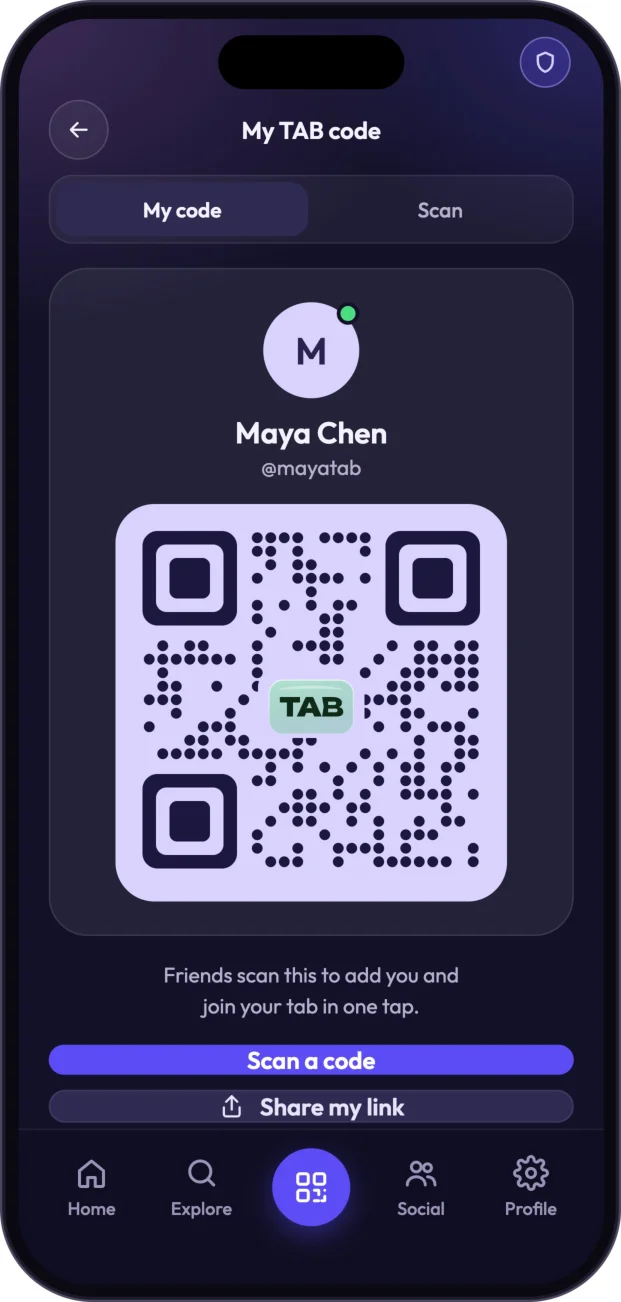
Profile connects this evening to the person behind it: name, handle, bio, city, and a status of Going out, Staying in, or Open to suggestions. Friends, Plans, Payment methods, and Show my TAB code sit alongside those details. My TAB code offers My code and Scan, so friends can scan to add someone and join their tab, with Share my link as another way to connect.
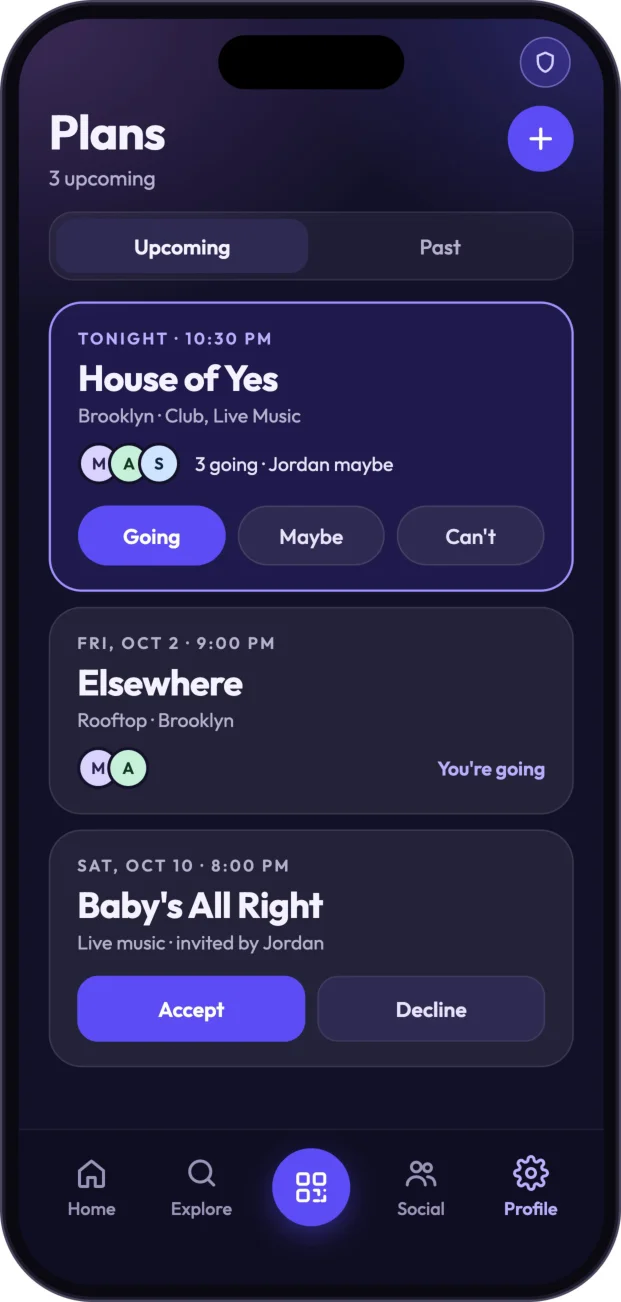
Plans separates Upcoming from Past and brings venue, date, time, and friends together with Going, Maybe, and Can’t responses. Invitations can be accepted or declined; Invite friends lets someone choose Tonight, a date, or a custom option, select friends, and add an optional note. A friend’s detail page adapts to their status: Poke or Invite out, Join at venue when they are out, or Suggest a spot when they are open to suggestions. Shared plans and Pay friend’s tab connect coordination to the rest of the night.
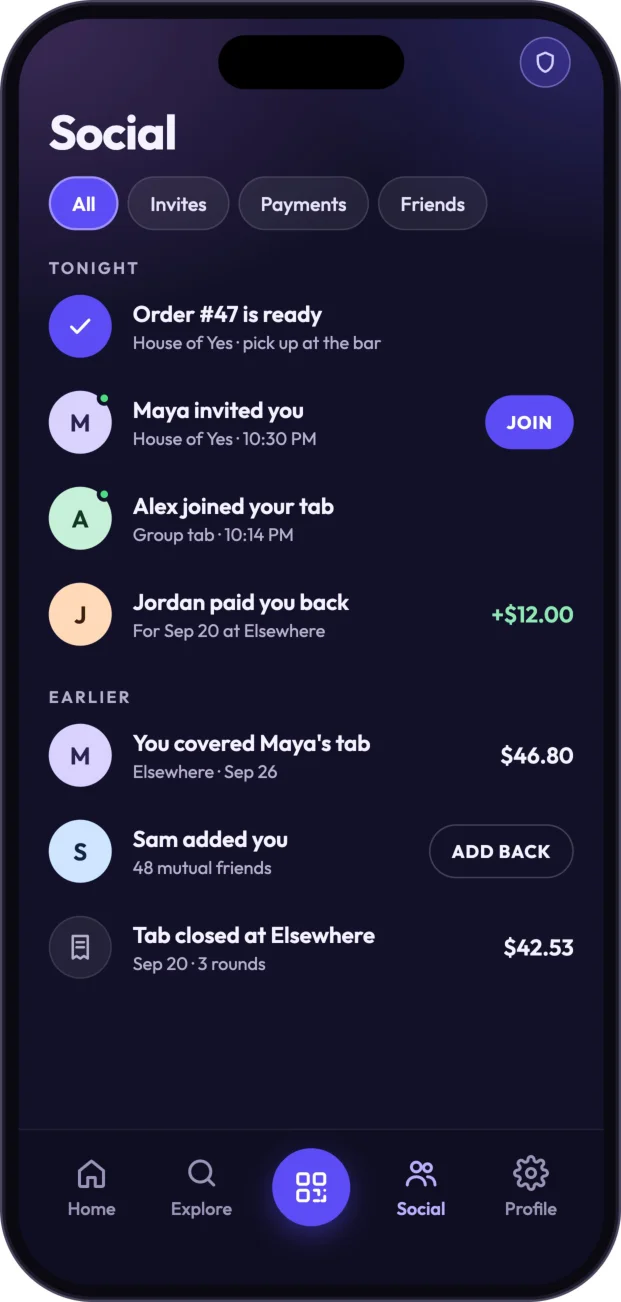
The Social feed mixes the updates that matter in this setting: order-ready alerts, invitations, friends joining group tabs, paybacks, covered tabs, added friends, and closed tabs. Venue pages provide menu, info, and group views, with categories and prices. Share to Story creates a venue-branded story using “Good people great nights” and “Meet me here.” The venue is therefore both a destination and the place where ordering begins.
Build a round and open a tab
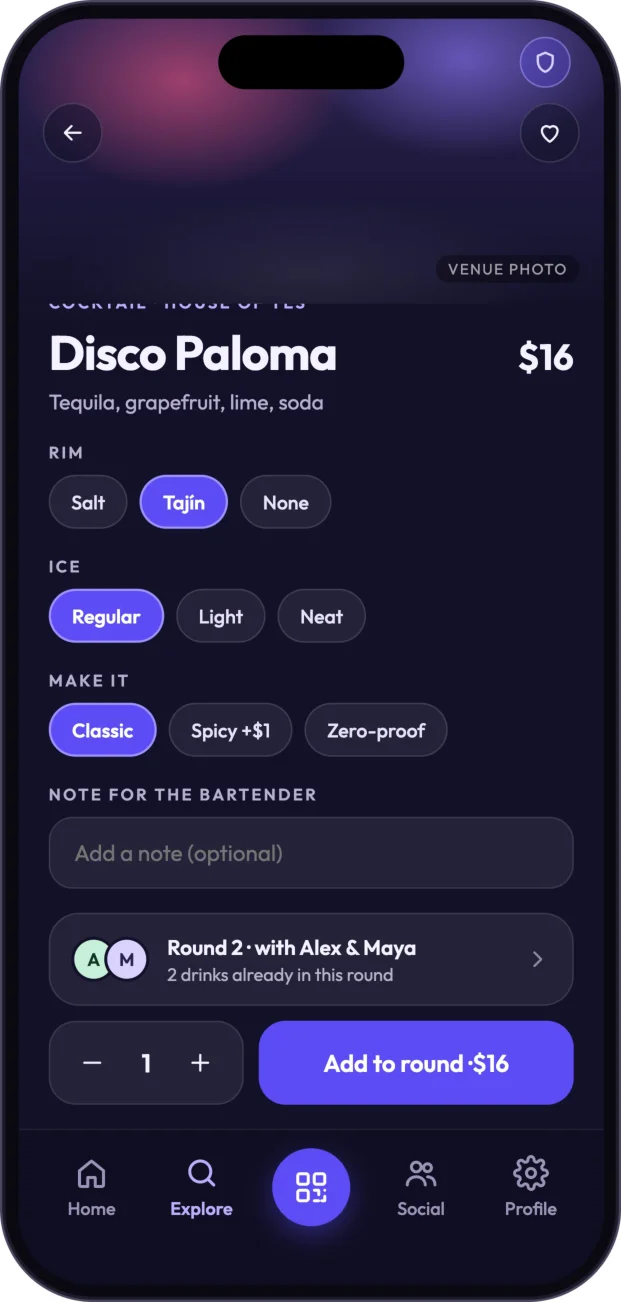
The venue’s invitation is explicit: “Order all night · pay once when you leave.” Choosing a drink leads into customization rather than immediately into checkout. The example Disco Paloma costs $16 and offers Salt, Tajín, or None for the rim; Regular, Light, or Neat for ice; and Classic, Spicy with a $1 addition, or Zero-proof. A bartender note and quantity complete the selection. Add to round places it alongside existing drinks, with friends visible in the round-building view.
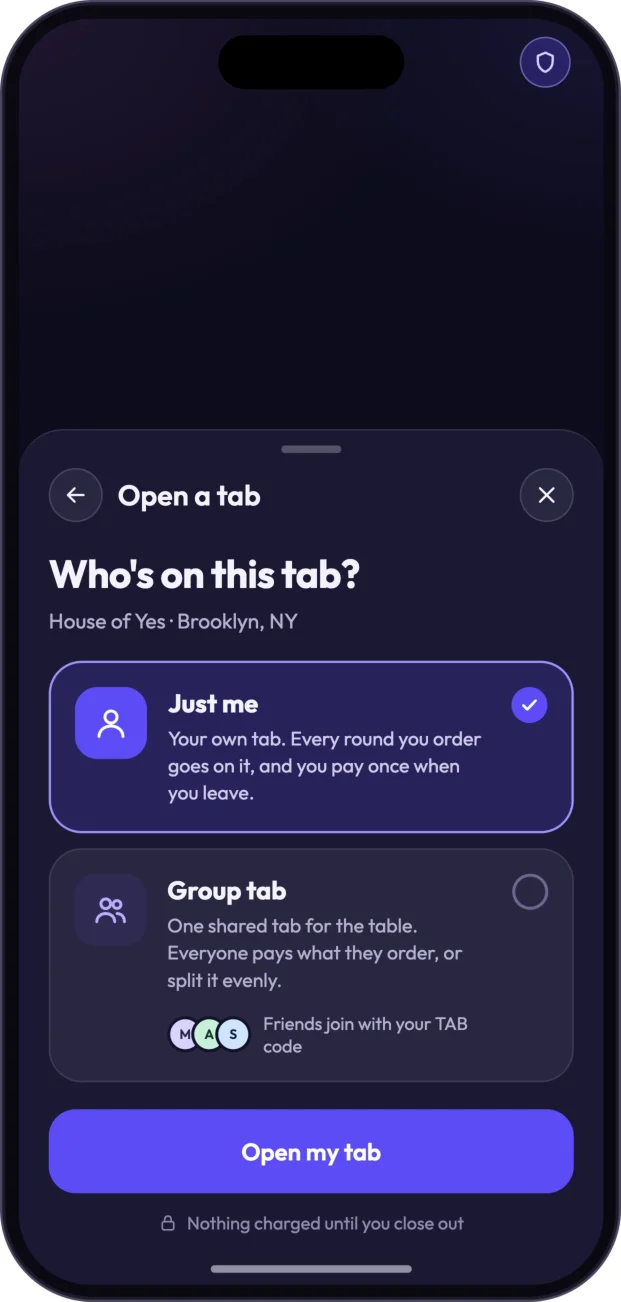
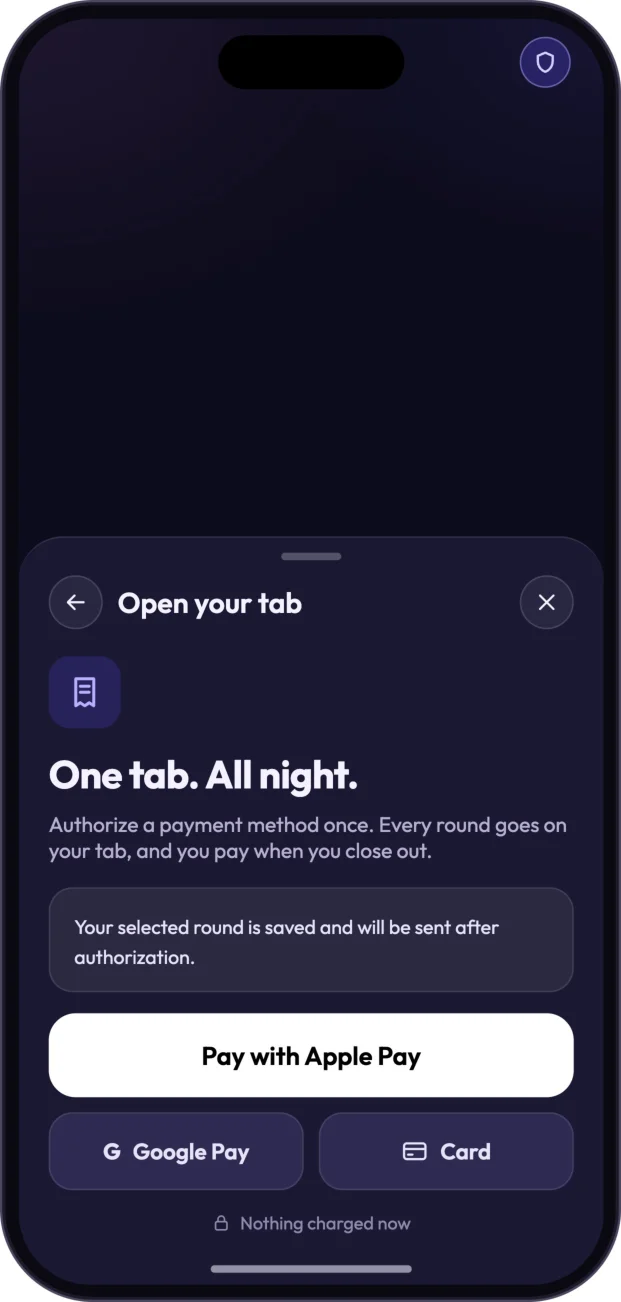
Opening a tab offers two arrangements. Just me puts all rounds on the customer’s own tab to be paid when leaving. Group tab creates one shared tab whose participants can pay what each orders or split evenly, with friends joining through a TAB code. TAB is designed around authorizing a payment method once, adding rounds to the tab, and paying at closeout. A selected round is saved and sent after authorization rather than discarded during setup.
Apple Pay, Google Pay, and Card appear as payment options. The Apple Pay demo shows a card ending 4242, $0.00 due now, and the action “Authorize & open tab.” That zero-due-now screen makes the distinction clear: opening the tab starts the evening’s running bill; paying settles it at the end.
Track the order and show the server
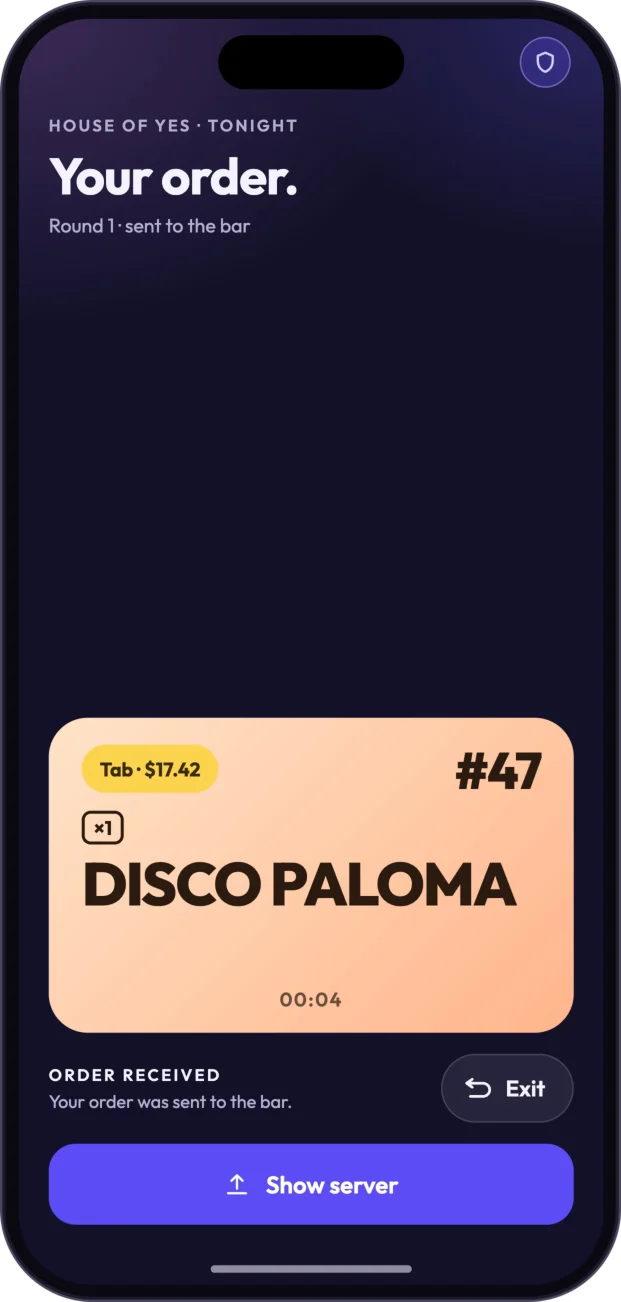
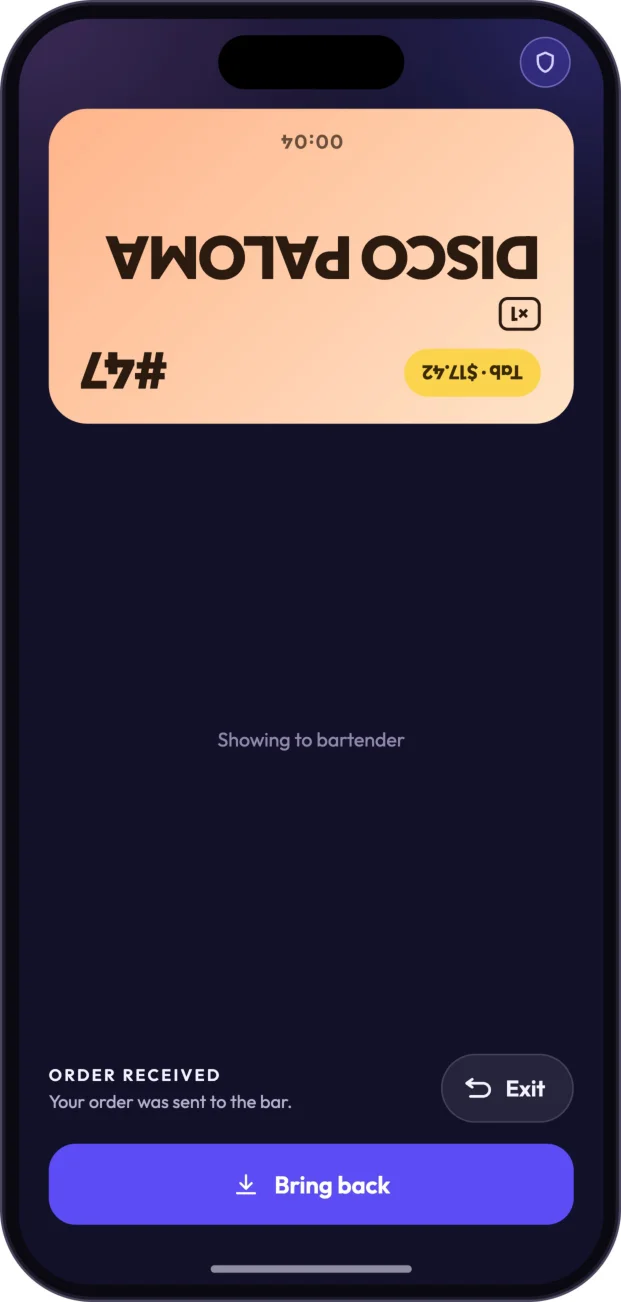
After a round is sent to the bar, the order screen brings together the venue, order number, item and quantity, timer, total, and an ORDER RECEIVED state. For example, order #47 gives the customer a clear reference for the round. Exit and Show server serve different purposes: the latter rotates the order display so a bartender can read it, while Bring back restores the customer-facing orientation.
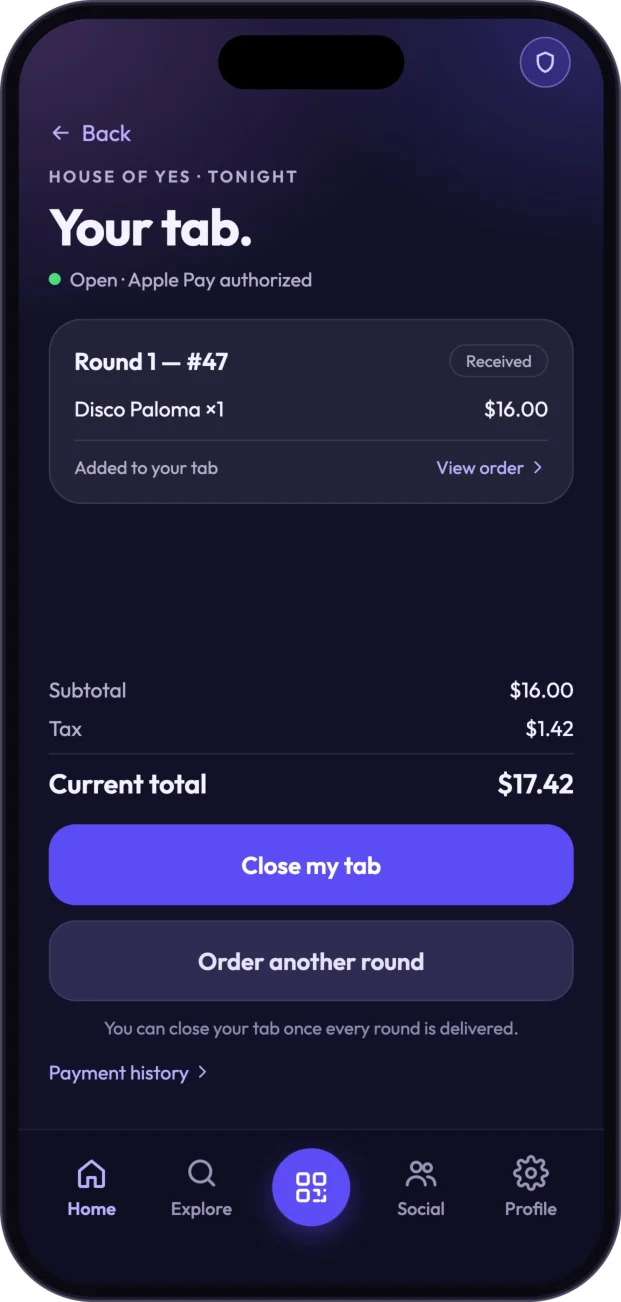
An order-ready notification tells the customer when to pick up their drinks at the bar. Your tab provides the broader view: an open tab with Apple Pay authorized, rounds with order numbers and statuses, View order, subtotal, tax, and current total. Order another round continues the evening; Close my tab becomes available once every round is delivered.
Share a group tab and cover a friend
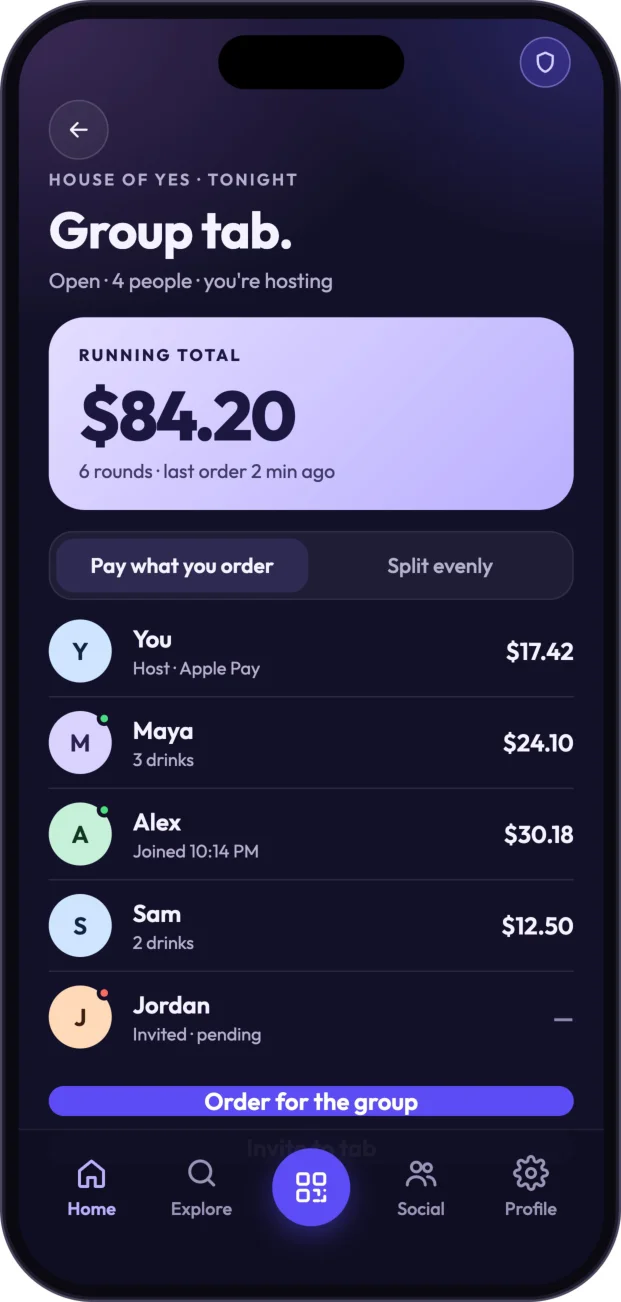
A group tab makes the social structure of the bill visible rather than leaving it to a separate conversation afterward. Its screen shows the running total, people, rounds, and individual balances, as well as the host and joined or pending friends. Pay what you order and Split evenly are distinct ways of allocating the bill. Order for group and Invite to tab keep ordering and participation within the same shared view.
Covering a friend is a separate gesture, not simply another split option. For example, Pay Maya’s tab reviews $46.80 at Elsewhere. Confirming payment closes Maya’s tab and notifies her; the confirmation reads “You covered Maya’s tab” and offers Send message or Done. A gesture that might otherwise involve a message and a separate payment becomes part of the same evening’s flow.
- Invite via TAB code
- Order together
- Pay by item or split evenly
Close, tip, and keep the receipt
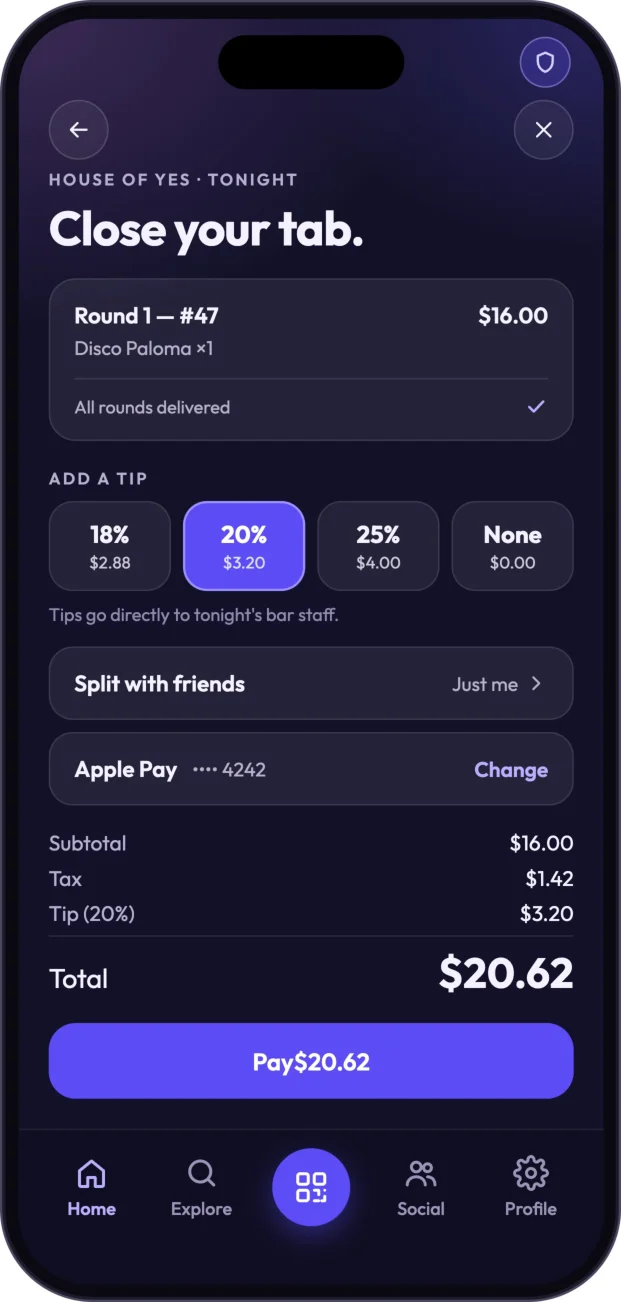
Closeout is reserved for delivered rounds. The review brings those rounds together with tip choices of 18%, 20%, 25%, or None, an option to split with friends, and the selected payment method with a change option. Subtotal, tax, tip, and total are presented before one final Pay action. For example, a $16 drink, $1.42 tax, and $3.20 tip come to $20.62. It is one settlement at the end rather than a new checkout for every round.
- Drink
- $16.00
- Tax
- $1.42
- Tip
- $3.20
- Total
- $20.62
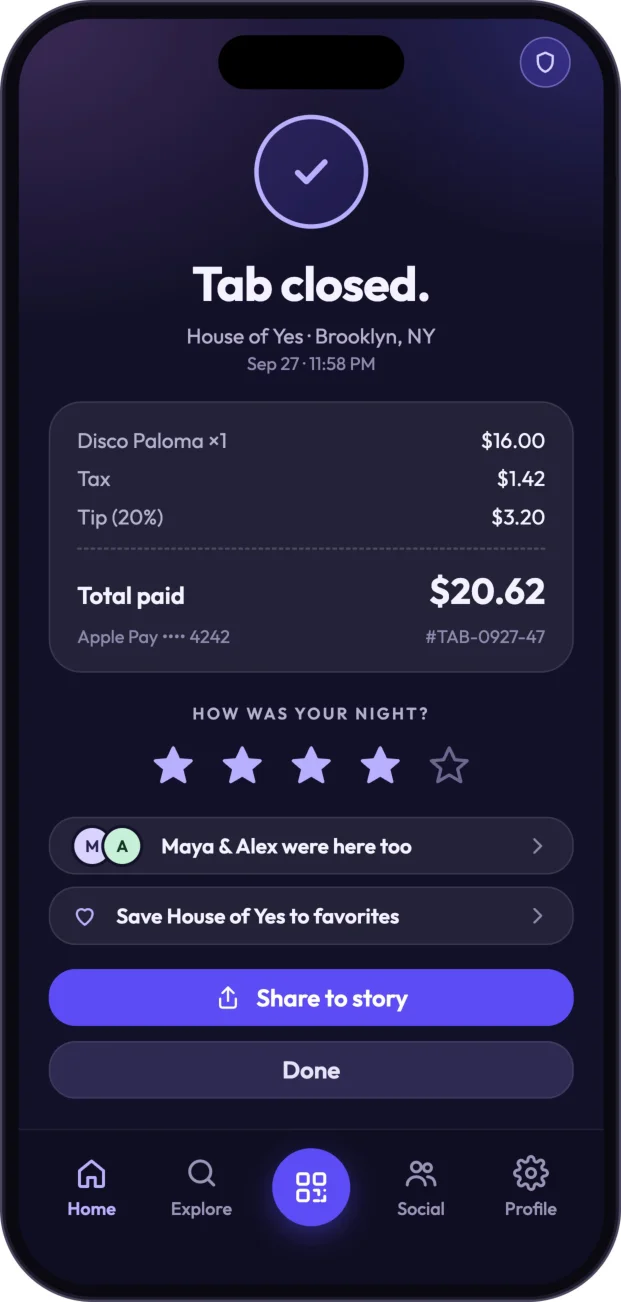
The receipt closes the loop back to the evening itself. It includes total paid, method, receipt number, venue, and time, then asks how the night was and shows friends who were there. Favorite venue and Share to story provide ways to carry that experience forward, while history retains the record. Payment becomes one part of remembering the night, rather than the only event the app records.
Discreet safety and a trusted circle
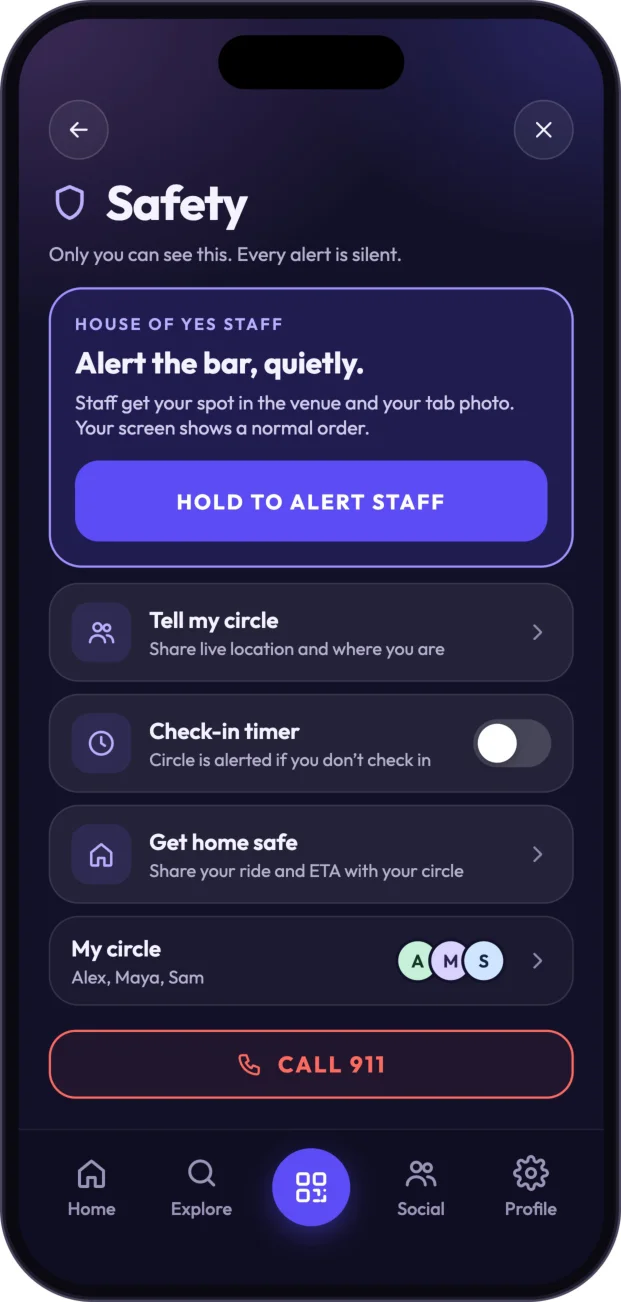
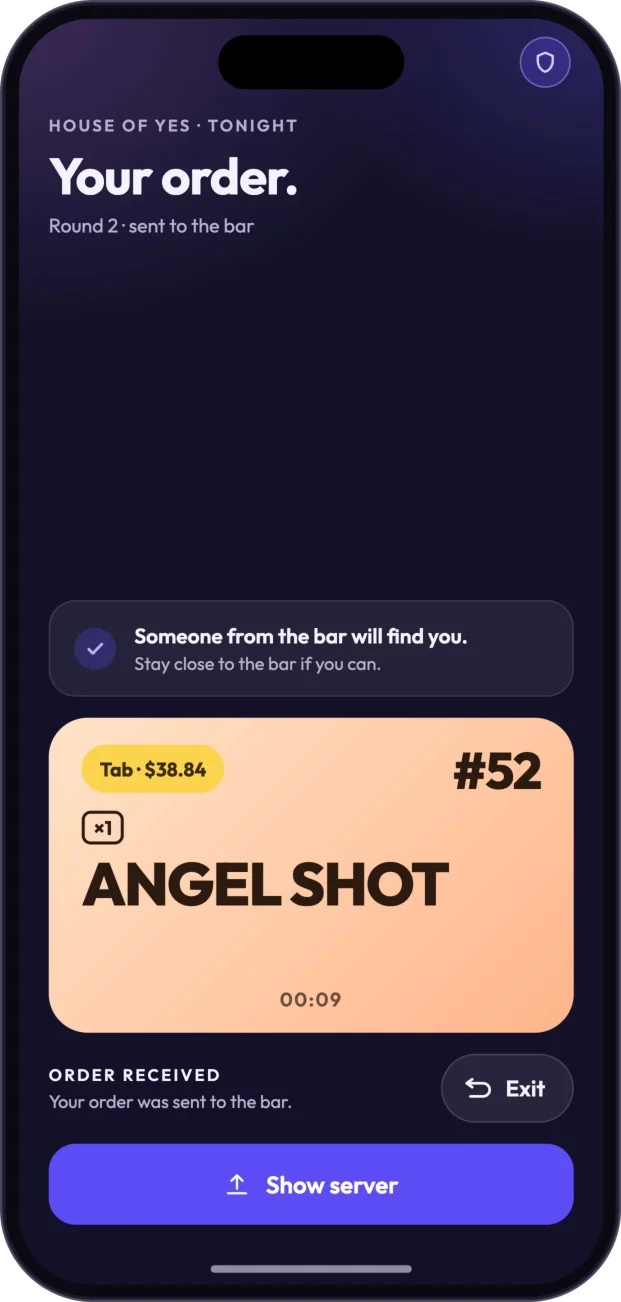
The safety flow lets someone seek help discreetly through a shield in the interface. It opens with “Only you can see this. Every alert is silent.” Hold to alert staff quietly is designed to share the customer’s spot within the venue and TAB profile photo while leaving the customer-facing display looking like a normal order screen. The Angel Shot screen guides the customer to stay close to the bar if they can, making it easier for staff to locate them.
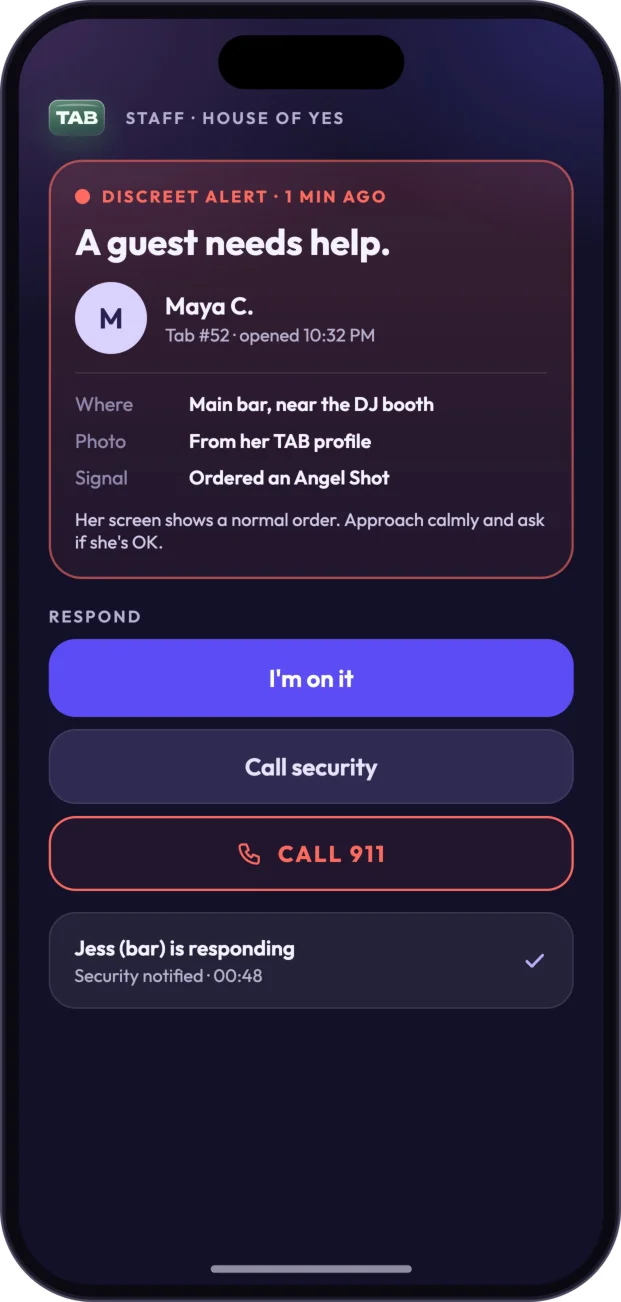
The staff view brings the alert into a practical context: the person’s name, tab, profile photo, and location, such as “main bar near DJ booth.” It identifies the signal as Angel Shot and asks staff to approach calmly and check whether the person is OK. I’m on it, Call security, and Call 911 sit alongside responder and status information, helping staff coordinate who is taking the next step.
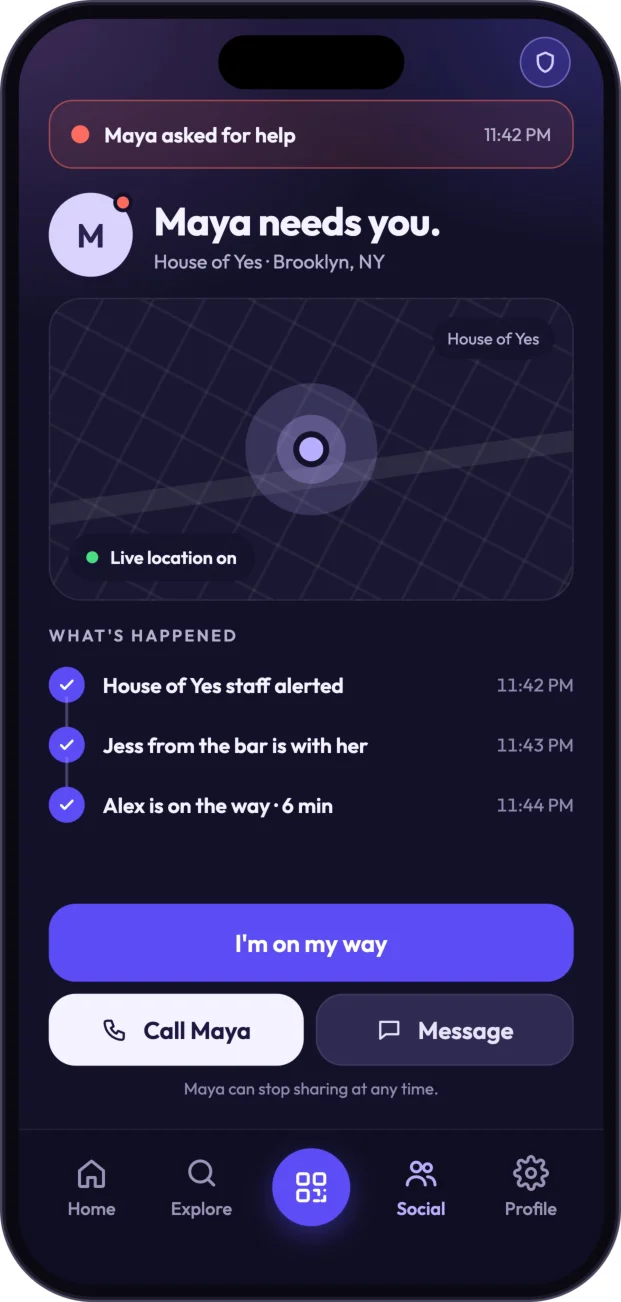
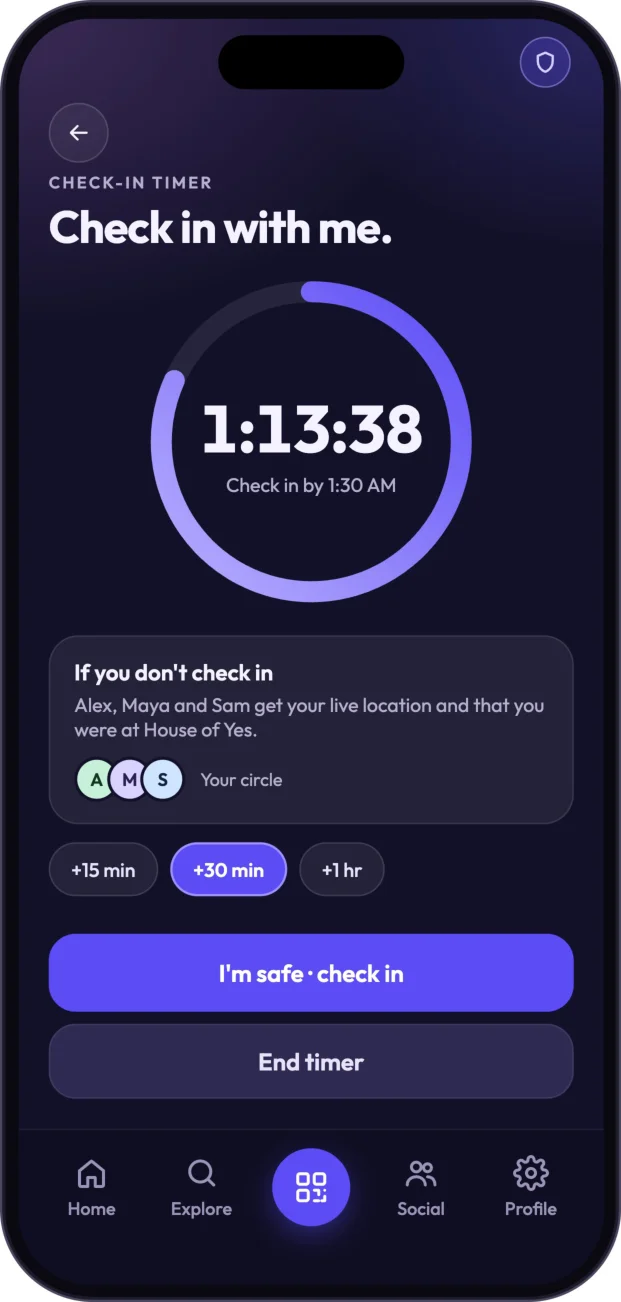
Tell my circle offers opt-in live location and venue sharing with trusted friends, who can see updates and respond with I’m on my way, call, or message. The user can stop sharing at any time. A check-in timer is designed to alert the circle if a check-in is missed, with extensions of +15m, +30m, or +1hr and options for I’m safe or End timer. Get home safe shares a ride and ETA. Alex, Maya, and Sam form the example circle, with an emergency Call 911 option also available in the safety view.
Ordinary social presence and safety sharing remain separate. Knowing that a friend is at a venue helps people plan a night out; sharing live location with a trusted circle is a deliberate, opt-in choice for staying connected when support matters.
Why this flow matters
TAB’s product idea is not another payment button. It is a connected sequence that begins before the first order and continues after the final receipt. Finding a venue, inviting friends, customizing drinks, showing an order number, allocating a shared bill, and paying at closeout are different steps, but each belongs to the same real-world interaction.
Keeping the running tab visible reduces the need to stop and reconstruct the bill. Clear group balances make it easier to order together, a readable order display helps with the handoff, and one end-of-night review replaces repeated checkout interruptions. TAB is designed to make those moments feel like parts of one evening rather than separate transactions competing for attention.
Open a tab once, order throughout the night, and pay when you leave.
The aim is less waiting, less checkout friction, and more time with friends. The interface should support the evening rather than become its focus, leaving people free to enjoy the place and the company they came for.
TAB
An OrangeTower Analytics concept exploring payments, hospitality and the transaction layer of social spaces.